_1779606969667-ZJZA6fNi.png)
_1777949319555-DTVd6WJp.png)
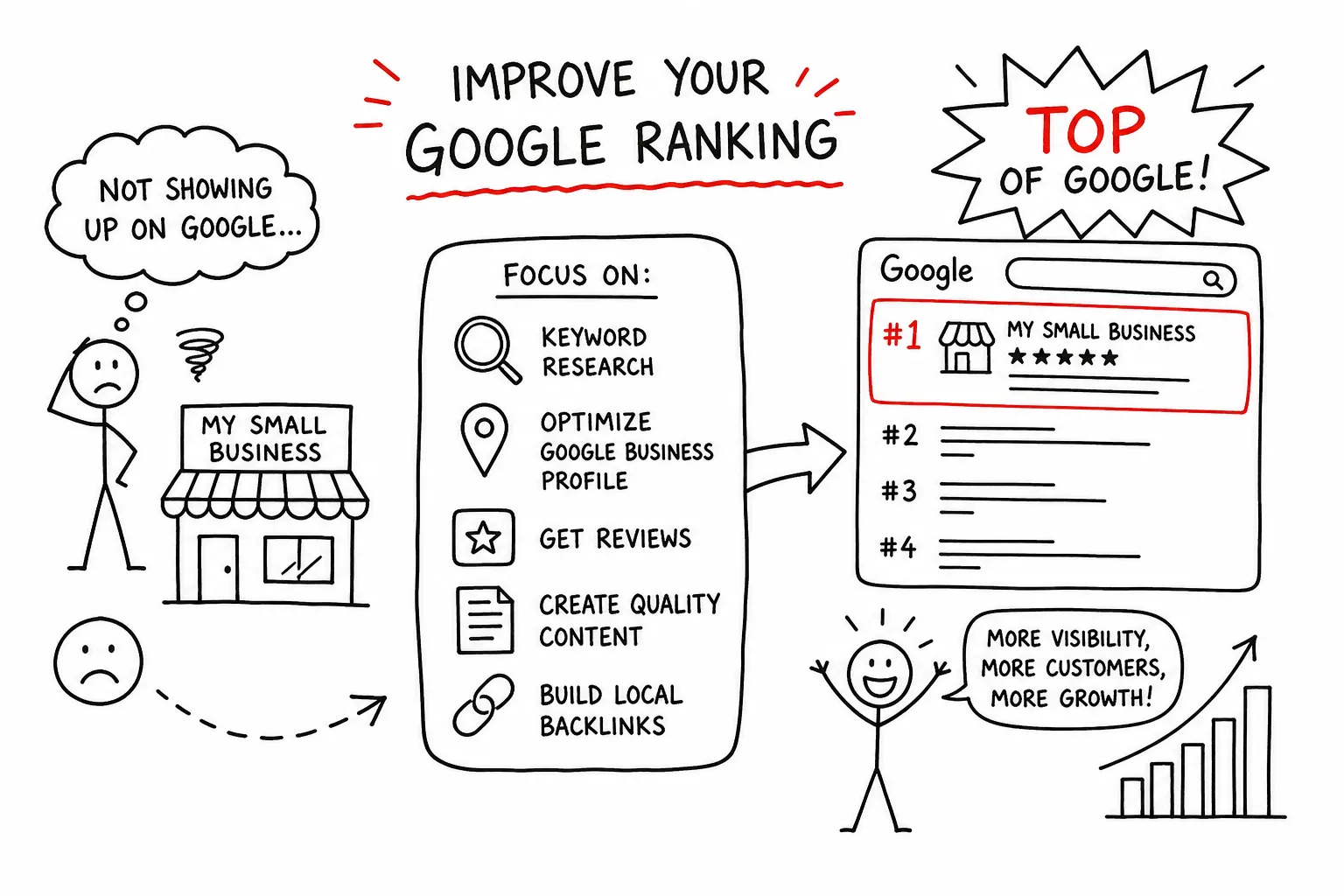
Most small business owners assume that improving their small business Google ranking requires either a serious budget or mysterious technical knowledge. It requires neither. The businesses sitting near the top of local search results have usually done a small set of foundational things consistently well, and most of those things cost nothing to fix.
Whether you are a tradie in Tauranga or a consultant in Christchurch, the same core signals determine whether your business appears near the top of a local search or gets buried several pages down. Here are 10 practical fixes you can start today, in the order most likely to move the needle.
What Google looks at when ranking local businesses
Google sorts local results using three core signals: relevance, distance, and prominence. Relevance asks whether your business matches what the searcher wants. Distance measures how close you are to the person searching. Prominence looks at how well-known and trusted your business appears across the web. These factors work together, and no single one completely overrides the others.
This framework tells you where to focus. Many owners jump straight to paid ads or start chasing backlinks before fixing the basics. But the Local Pack — the three businesses shown with a map near the top of a local search — is heavily influenced by Google Business Profile information, reviews, and clear local signals on your website.
1. Choose the right primary category
Your primary category is one of the most important decisions in your Google Business Profile. It tells Google what your business fundamentally is and acts as a strong relevance signal. Choosing the wrong category, or leaving it too broad, is a common reason businesses fail to appear for searches they should be visible for.
Choose the most specific category that accurately describes your main service, not the broadest or most aspirational option. Then add appropriate secondary categories for genuine supporting services without trying to cover everything.
2. Complete every useful profile field
A complete profile gives Google and potential customers more confidence in your business. Add an accurate business description, your full service list, current opening hours, service areas, attributes, website link, and contact details. Check holiday hours before each public holiday too.
Treat your Google Business Profile as a living listing rather than a one-time setup. Review it regularly so old services, outdated hours, and unanswered questions do not weaken the experience.
3. Add current, genuine photos
Upload clear, recent photos of your team, premises, completed work, vehicles, products, or the service in action. Genuine business photos are more useful than generic stock images because they help customers recognise and trust the business they are considering.
Photos also improve engagement. Google reports that businesses with photos receive more requests for directions and more website clicks than businesses without them. Add a useful starting set, then keep adding new images as the business changes.
4. Publish useful Google Posts
Google Posts let you share recent work, seasonal reminders, service updates, offers, and useful advice directly on your profile. Posting regularly shows customers that the business is active and gives them another reason to click through.
Keep posts specific and practical. A short before-and-after story, a newly completed project, or a reminder about an in-demand seasonal service is more useful than a generic promotional message.
5. Ask for genuine reviews consistently
Reviews are more than social proof. Google considers review volume, average rating, recency, and the overall pattern of new feedback. A steady stream of genuine reviews is more natural and useful than a sudden spike after months of silence.
Ask directly after a successful job or purchase, while the experience is still fresh. A short text or email with a direct link to your Google review page removes friction. Never offer incentives for reviews: Google prohibits it, and incentivised feedback often looks generic.
There is no universal target. In many NZ markets, 30 to 50 genuine reviews can put a small business in competitive contention, while busy central markets may require more. Search your main service and location, study the current top three businesses, and use their review profiles as a realistic local benchmark.
6. Respond to every review
Responding to positive and critical reviews shows that your profile is actively managed and reassures future customers that there is a real, attentive business behind the listing.
Keep replies personal and useful. Thank the reviewer, refer briefly to the service they received where appropriate, and address concerns calmly without turning the reply into an argument. Make responding a regular habit rather than an occasional clean-up task.
7. Improve your website's mobile speed
A slow or unstable website frustrates visitors and weakens the experience after they click from Google. The practical Core Web Vitals targets are a Largest Contentful Paint under 2.5 seconds, Interaction to Next Paint under 200 milliseconds, and Cumulative Layout Shift of 0.1 or lower, measured across real visits.
Start with the biggest wins: compress oversized images, remove unnecessary scripts, use reliable hosting, and test important pages on an actual phone. Use GTmetrix to get a practical view of your current loading performance. A faster site does not just support search visibility — it also converts more of the traffic you already receive.
8. Strengthen the local signals on your website
Your homepage and service pages should clearly state what you do and where you do it. Include your genuine location or service area naturally in the page title, main heading, body copy, contact details, and relevant internal links.
If you serve several cities, build a genuinely useful page for each location rather than copying one page and swapping the suburb name. Unique local content, relevant projects, service details, and FAQs give both visitors and Google a better reason to trust each page.
9. Add LocalBusiness structured data
LocalBusiness schema is structured data that helps Google confirm key facts from your website, such as your business name, address, phone number, opening hours, and website. It reinforces the same core details shown on your Google Business Profile.
The markup must match the visible information on the page. Structured data cannot compensate for weak content or inaccurate business details, but it gives search engines a clearer machine-readable version of information you already publish.
10. Fix inconsistent business details across the web
NAP stands for Name, Address, and Phone number. These details should match wherever your business appears. For NZ small businesses, start with Google Business Profile, Apple Business Connect, Bing Places, and Facebook, then check relevant local directories such as Yellow, Finda, Localist, Zenbu, Hotfrog, and White Pages.
Conflicting phone numbers, old addresses, or variations of your business name make it harder for customers and search engines to verify the business. Audit your listings once a year: search your business name in quotation marks, then your phone number and full address, record each listing, and correct the most important sources first. Whitespark's NZ citation source list is a useful reference when deciding which directories to check.
How long do local SEO improvements take?
Google Business Profile improvements such as category corrections, new photos, and completed details can produce measurable changes in views, calls, and direction requests within two to six weeks. Page-title and on-page relevance fixes can also show movement within a few weeks on pages that already have some authority.
Citation and NAP clean-up usually takes longer because directory updates can propagate slowly. Allow two to four months for those changes to settle. Review growth compounds gradually, so measure progress over at least 90 days using profile interactions, organic traffic, calls, and enquiry quality rather than checking rankings every morning.
Results depend on your starting point, location, and competition. No responsible provider can guarantee a particular ranking, but consistently improving these foundations gives Google better reasons to understand, trust, and show your business.
Improving your small business Google ranking does not require a huge budget or a technical background. Start with the right profile category, complete every useful field, add real photos, ask for reviews steadily, respond to customers, and make sure your website and business details send the same clear local signals.
If you would rather have the foundations checked and improved properly, Fairweb can help with Google Business Profile optimisation and local SEO for NZ small businesses.
Frequently Asked Questions
How does Google rank local businesses in search results?
Google uses three core local ranking signals: relevance, distance, and prominence. Relevance is how closely the business matches the search, distance is how near it is to the searcher, and prominence reflects how well-known and trusted the business appears online. The signals work together rather than one always overriding the others.
What is the most important part of a Google Business Profile?
Your primary category is one of the most important profile choices because it tells Google what your business fundamentally is. Choose the most specific category that accurately describes your main service, then use relevant secondary categories only for genuine supporting services.
What quick changes can improve my Google Business Profile visibility?
Complete every useful field, including the description, services, hours, attributes, and service areas. Add current business photos, publish useful Google Posts, check that your contact details are accurate, and keep the profile updated rather than treating it as a one-time setup.
Do customer reviews affect my Google ranking or just provide social proof?
Reviews support both visibility and conversion. Google considers factors such as review volume, rating, recency, and the overall pattern of feedback. A steady stream of genuine recent reviews is generally more useful than a sudden spike, while strong reviews also make searchers more confident about choosing you.
How often should I respond to reviews on my profile?
Respond to every review as promptly as practical, including critical reviews. Regular, thoughtful replies show that the profile is actively managed and reassure potential customers that the business listens and takes service seriously.
Should I spend money on ads or chase backlinks before fixing my local listing?
Fix the foundations first. Accurate Google Business Profile information, genuine reviews, clear local website content, mobile performance, and consistent business details usually deserve attention before paid campaigns or aggressive backlink work. Ads can generate traffic, but they do not repair weak local signals.
How many Google reviews should a small business aim for in New Zealand?
There is no single target for every market. Around 30 to 50 genuine reviews can be competitive in many NZ locations, while high-competition areas may require more. The best benchmark is the current top three businesses for your main service and location. Focus on steady, honest review growth rather than a one-off number.
Related Service
SEO & Local SEO
See how Fairweb supports New Zealand small businesses with seo & local seo.
Learn more